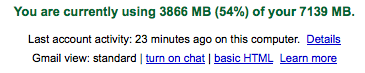
My gmail account is currently pretty large so I wanted to get an idea of where the data was sitting. I got curious about how to visualize the data behind my account.
In particular, I wanted to get answers to questions such as:
- attachments-size included, which years and quarters are taking so much space?
- which day of the week is the busiest?
Here are a couple of steps to build a small kind of datawarehouse around your GMail history to become able to answer these questions.
Retrieving the data
To retrieve the data, I relied on the well-tested Mac OS X Mail client instead of coding it myself, as the amount of data is quite large and I wanted to avoid reliability issues that you’d most likely get by trying to fetch a couple of gigabytes from an email account.
I ensured that all the emails were downloaded by using the Mailbox / Synchronize menu item (and that took quite a long time – a couple of hours to the least).
Extracting and transforming the data
After searching a bit, I discovered that Mail stores each mail as a separate file with an .emlx extension. Basically, the first line is the length of the message in bytes, then comes the message itself, then some bits of data (plist) stored.
I noticed that the downloaded data is stored under this folder:
/Users/myusername/Library/Mail/IMAP-myadress@imap.gmail.com/The following ruby code helps us find all the relevant emails:
folder = '/Users/myusername/Library/Mail/IMAP-myadress@imap.gmail.com/'

Dir["#{folder}/**/*.emlx"].each do |file|
  row = extract_emlx_content(file)
end
Now how to read the email data itself? After testing it on a few emails files, I found out that the RubyMail library knows how to parse these emails properly.
require 'rubygems'
require 'rmail'

def extract_emlx_content(file)
  results = {}
  File.open(file) do |input|
    input.readline # skip the first line
    message = RMail::Parser.read(input)
    results[:message_id] = message.header.message_id
    # more fields to extract here
  end
  results
end
As I wanted to compute the attachments size, I found out that they are stored under a specific folder for each email and that I could sum the files sizes to get an idea:
def folder_size(name)
  Dir[name+'/**/*'].inject(0) do |sum, file|
    sum + (File.file?(file) ? File.size(file) : 0)
  end
end
then add the following to our extract_emlx_content:
email_number = File.basename(file, '.emlx')
results[:email_number] = email_number

attachment_folder = File.join(
  File.dirname(file), '..', 'Attachments', email_number)
results[:attachments_size] =
  File.exists?(attachment_folder) ?
    folder_size(attachment_folder) : 0

results[:total_size] =
  results[:size] + results[:attachments_size]
From here, you can add the fields that would be useful to you for your analysis (sending date, from etc).
Full code for extract, transform, output
Here the full code for the extract and transform. We’ll output everything we want into a CSV file thanks to FasterCSV.
require 'date'
require 'rubygems'
require 'rmail'
require 'fastercsv'

folder = '/Users/myusername/Library/Mail/' \
  'IMAP-myadress@imap.gmail.com/'

def folder_size(name)
  Dir[name+'/**/*'].inject(0) do |sum, file|
    sum + (File.file?(file) ? File.size(file) : 0)
  end
end

def extract_emlx_content(file)
  results = {}
  File.open(file) do |input|
    input.readline # skip the first line
    message = RMail::Parser.read(input)

    results[:message_id] = message.header.message_id
    results[:size] = File.size(file)
    results[:date] =
      message.header.date.strftime("%Y-%m-%d %H:%M:%S") rescue nil
    results[:content_type] = message.header.content_type
    results[:from] =
      message.header.from.first.address rescue "unknown sender"

    email_number = File.basename(file, '.emlx')
    results[:email_number] = email_number

    attachment_folder = File.join(
      File.dirname(file), '..', 'Attachments', email_number)
    results[:attachments_size] =
      File.exists?(attachment_folder) ?
        folder_size(attachment_folder) : 0

    results[:total_size] =
      results[:size] + results[:attachments_size]
  end
  results
end

columns = [:message_id, :date, :size, :content_type,
           :attachments_size, :total_size,
           :email_number, :from]

FasterCSV.open("gmail-history.csv", "w",
               :col_sep => ";") do |output|
  output << columns
  Dir["#{folder}/**/*.emlx"].each do |file|
    row = extract_emlx_content(file)
    output << columns.map { |c| row[c] }
  end
end
As I said, more fields can be added depending on the analysis you want to carry out. You may want to know how many emails contains the word “youtube”, for instance, and see how it varies over time!
Visualizing the data
To visualize the outputted data, I chose to use Tableau Software as it is very convenient to dive into data, compute calculated fields or more. Here are the results:
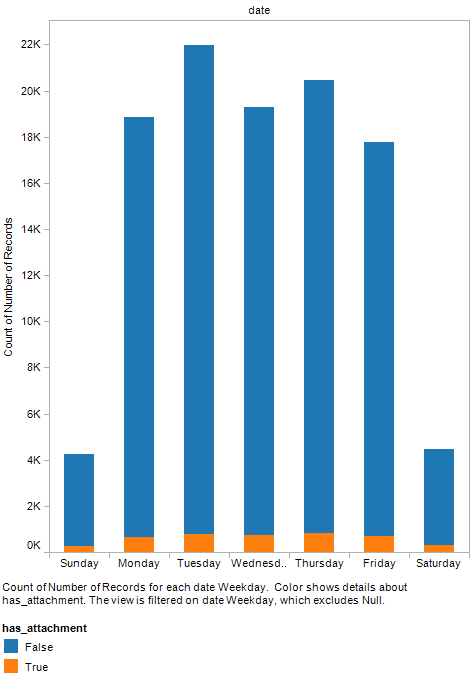
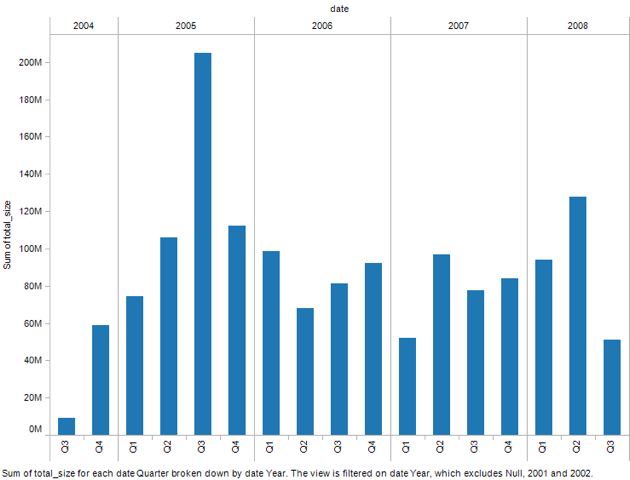
As you can see from these graphs, 2005 is taking a bit more space in my mailbox, and I receive a lot fewer emails on Saturdays and Sundays.
Of course you could visualize the data using other tools as well. You’ll have to add a few transforms to extract the required data (eg: extract Year+Quarter for instance).